
Laptop guide
Laptop Hinge Broken or Screen Frame Lifting?
Avoid worsening laptop hinge damage and learn why the hinge, lid, mounting points and display cable should be assessed together.
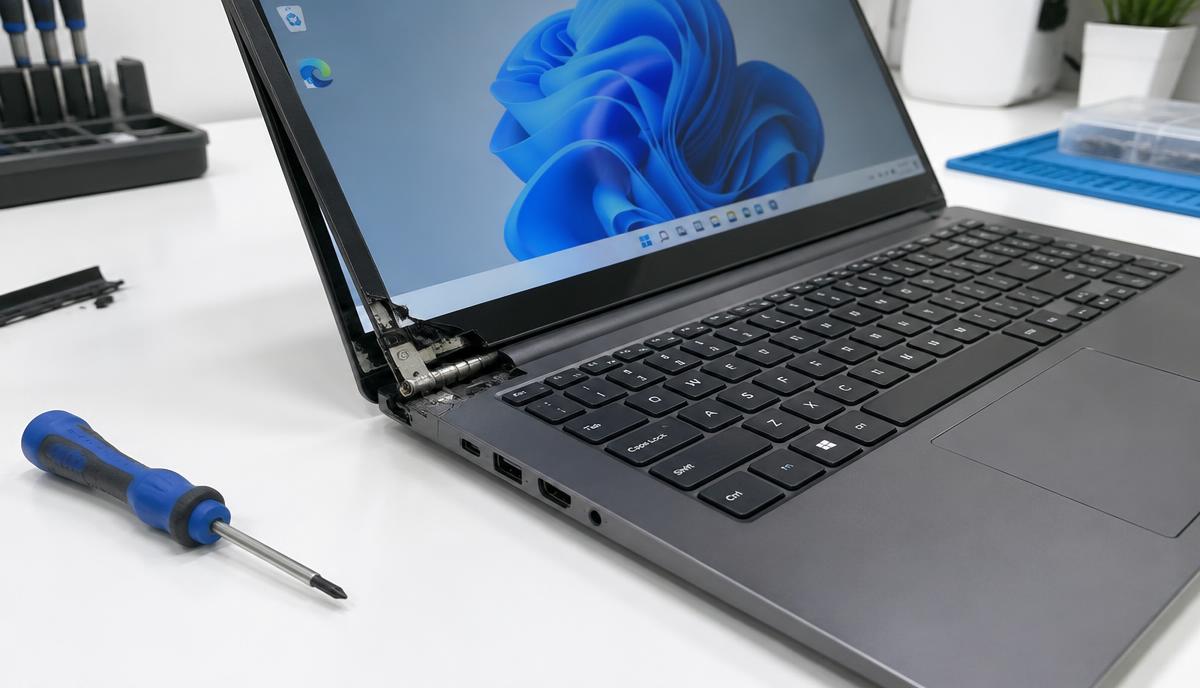
A stiff hinge or separating screen bezel is not just cosmetic. Opening the lid can place pressure on mounting points, the display and internal cables when the assembly is already damaged.
What the symptoms can mean
Cracking noises, a corner lifting from the base or a lid that no longer stays in position can indicate hinge or mounting damage. A flickering display during lid movement may involve the display cable as well.
What to do next
Stop forcing the lid. If the laptop is stable in its current position, back up accessible files without repeatedly opening and closing it. Power it down for transport and ask how to protect the damaged assembly.
Why the complete assembly matters
A hinge can remain intact while its plastic or metal mounting points fail. Assessment should cover the hinge resistance, base and lid mounts, bezel, screen and cable path. Replacing only a hinge will not address every broken mounting point.
What to confirm before repair
Send the exact laptop model and photos of the damage. Ask which housings or hinge parts are required and whether the display has also been affected. Avoid glue, oil or makeshift screws around the screen and battery; these can complicate later service.
When to arrange a diagnosis
If the problem continues after safe basic checks, a proper diagnosis is the best next step. It helps separate a replaceable part from a deeper board, power or software issue before any repair is approved.
Common questions
Can I keep forcing a stiff laptop hinge?
No. Additional force can damage the mounting points, lid or display cable.
Does hinge repair always require a new screen?
No. The screen and surrounding housings should be assessed separately before parts are selected.